500 Errors with suPHP
Tuesday, March 2nd, 2010
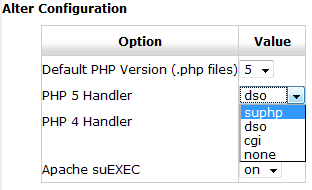
Found in WHM via Main >> Service Configuration >> Apache Configuration >> PHP and SuExec Configuration
We were recently migrating websites from one dedicated server to another dedicated server, both of which had basically the same software setup with an upgrade in the hardware.
For the ease of use in a web based GUI, we recommend cPanel/WHM to facilitate the majority of setup, and this was no different. You place the order with the dedicated hosting company stating everything that you want, including the control panel, and you’re on your way and able to run through your standard setup procedures.
When you’re done setting up the server you can begin migrating from the old server to the new server (WHM has an excellent tool for migrating between WHM/cPanel based servers). And most of the time everything is looking good and after a local run-through you can update the DNS and be on your way.
All of that to say, during this recent migration we spotted 500 (generic “internal server”) errors that we had not seen before. After troubleshooting, it was determined to be due to some .htaccess rules being added and/or certain files and/or folders having write permissions (ex: 777). Now we knew what was causing it and could fix it to some extent, but we still wanted to know why. What had changed from the last server to the new one?
After looking around for similar situations, we pieced together where we should be looking, the PHP Handler. The old server was running dso. The new server was running suPHP which wasn’t even installed on the old server. So we switched the new server to dso (see image above) and things were back to working the way they were before. (Note: from what we were seeing, suPHP is harder on your hardware resources as well.)
As a word of caution, web hosts do setup suPHP as an additional layer of security and it is advisable to not set directories and/or files to writable unless they need to be.
Related Blogs
WordPress 2.8.3
Monday, August 3rd, 2009WordPress 2.8.3 was released on August 3rd, 2009 as is a security release.
Several folks in the community dug deeper and discovered areas that were overlooked. With their help, the remaining issues are fixed in 2.8.3. Since this is a security release, upgrading is highly recommended.
Schedule your WordPress upgrade today via our WordSprung WordPress Upgrade Service.
WordPress 2.8.2
Monday, July 20th, 2009WordPress 2.8.2 was released on July 20th, 2009 as is a security release.
WordPress 2.8.2 fixes an XSS vulnerability. Comment author URLs were not fully sanitized when displayed in the admin. This could be exploited to redirect you away from the admin to another site.
Schedule your WordPress upgrade today via our WordSprung WordPress Upgrade Service.
WordPress 2.8.1
Friday, July 10th, 2009WordPress 2.8.1 was released on July 9th, 2009 and is a bug fix & security release.
WordPress 2.8.1 fixes many bugs and tightens security for plugin administration pages. Core Security Technologies notified us that admin pages added by certain plugins could be viewed by unprivileged users, resulting in information being leaked. Not all plugins are vulnerable to this problem, but we advise upgrading to 2.8.1 to be safe.
Schedule your WordPress upgrade today via our WordSprung WordPress Upgrade Service.